

| # | App | Best for | Platforms | Price |
|---|---|---|---|---|
| 1 | Lilo Study Timer | Focusing next to other people | iPhone, iPad, Android | Free + optional Lilo Premium |
| 2 | iPhone Focus and Screen Time | Silencing notifications and limiting apps | Built into iPhone, iPad and Mac | Free (built in) |
| 3 | Android Digital Wellbeing | Pausing distracting apps | Built into Android | Free (built in) |
| 4 | Google Calendar | Blocking out study time | iPhone, iPad, Apple Watch, Android, web | Free |
| 5 | Notion | Keeping notes and tasks in one place | Web, Mac, Windows, iPhone, iPad, Android | Free (Education Plan free for college students) |
| 6 | Goodnotes | Active study from PDFs, by hand | iPad, iPhone, Mac, Windows, Android tablets, web | Free (3 notebooks) + paid plans |
| 7 | Khan Academy | Getting unstuck on a topic | Web, iPhone, iPad, Android | Free |
Disclosure: Lilo is made by our studio, Pado Apps. We do not rank other study timers against our own. Instead, this list pairs Lilo with free tools that do a different job. Facts about every other tool come from its own website, help pages or store listing, checked in October 2026.
Most “best focus apps” lists put every app in one pile, as if every focus problem were the same. It is not. Pausing your apps is useless if your real problem is that you cannot make yourself start. A study room will not help if you open TikTok every four minutes. And no app fixes a chapter you do not understand.
So this guide starts with the reason you lose focus, then shows the best tool for that reason. You will find 7 focus apps and tools for students below, with what each one actually does, the platforms, the price and who it is not for. Several of them are already on your phone.
Quick picks: the right focus tool for your problem
- You cannot make yourself start, or studying alone feels endless: Lilo, for live study rooms with other students and challenges with friends.
- Your iPhone keeps pulling you away: Focus and Screen Time, already in your Settings.
- Your Android phone keeps pulling you away: Focus mode in Digital Wellbeing, also already in your Settings.
- You never get round to it: Google Calendar, to give every session a fixed time.
- Your notes and tasks are everywhere: Notion.
- Your mind wanders while you read: Goodnotes, to work through PDFs with a pen.
- You drift off because you are stuck: Khan Academy.
- Your study spot is noisy: some free study music in Lilo, or our guide to the best study music for focus.
How we picked these focus apps and tools
We looked for tools that students actually use, then checked each one against the same questions:
- Does it solve one real focus problem well? Starting, distractions, planning, messy notes or being stuck.
- Can a student start for free? Every tool here is free or has a free version. Where something costs money, we say so.
- Does it work on the devices students use? Phone first, with laptop support noted.
- Are the facts right? Every fact on this list comes from the tool’s own website, help pages or App Store or Google Play listing, checked in October 2026. Prices change by country, so check the store before you pay.
One more thing you should know: we make Lilo. It sits at number one because it is built for one specific problem, focusing when studying alone feels impossible. We do not rank other study timers against our own, so this list pairs Lilo with free tools that do a different job. Where Lilo cannot help, like locking your phone, we say so plainly and point you to the tools that can.
First, figure out why you lose focus
Before you download anything, think about your last bad study session. Which of these was it?
- The phone pull. You sit down, then pick up your phone “for a second” and lose 30 minutes. You need fewer notifications, paused apps, or at least distance from your phone.
- The start problem. You never really begin. You tidy your desk, make a plan, check one thing. You need a reason to start right now: a fixed time, a timer, a person, or all three.
- The lonely slump. You start, but studying alone feels endless and you drift off after 15 minutes. You need company, even virtual company.
- The messy desk (digital edition). Notes in five places, tasks in your head, ten tabs open. Every time you look for something, you lose the thread.
- The glazed-over reading. You read the same page three times and nothing sticks. Passive reading is where minds wander most.
- The stuck problem. You hit something you do not understand, and suddenly your phone looks very interesting.
Most students have two of these. That is fine: one tool for each is enough.
1. Lilo Study Timer: best for focusing next to other people
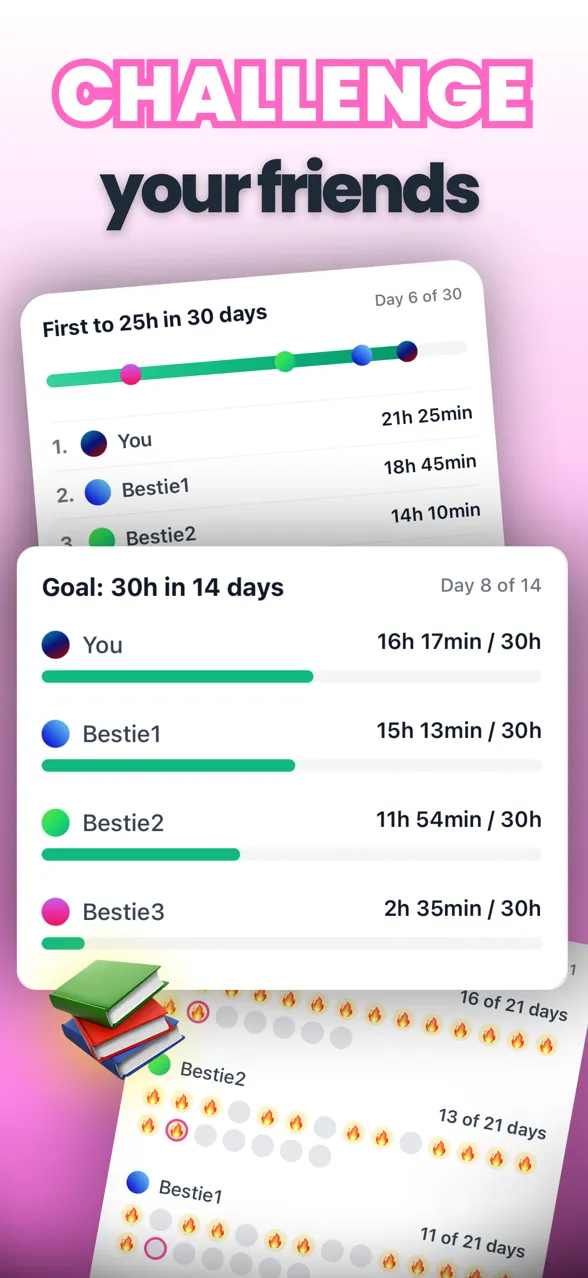 Lilo’s study challenges: a speed race, a shared time goal and a streak with friends.
Some students do not lose focus because of their phone. They lose it because studying alone is boring, lonely and easy to put off. That is the problem Lilo Study Timer is built for.
When you start a session, you can take a desk in a live 3D study room: the Classroom, the Café, the Library or the Seaside terrace, plus seasonal rooms. Everyone in the room has a name tag with their country flag and their live study time, so you can see other people working right now. Nobody is on camera: Lilo does not use your camera or microphone. Public rooms have no chat, so they stay quiet, but you can wave at people.
For your own group, you open a private room with a 6-character code or an invite link, and private rooms have a chat. You can also start study challenges with friends (a time goal, a speed race, a ranking battle or a streak), follow a friends feed and climb rankings. Your streak can be protected with XP you have earned, and the mascot Lilo changes outfit as you climb through 101 levels.
The free timer is a Focus countdown with four scenes: Classic, Coffee, Sleeping cat and Rainy window. Stopwatch and Pomodoro modes come with Lilo Premium, along with 30+ more scenes, the full music library, unlimited challenges and planning, and advanced stats. There is also a day planner (up to 2 tasks a day on the free plan) and some free study music.
- Best for: students who focus better when they can see other people studying, and friends who want to keep each other going
- Platforms: iPhone, iPad and Android, in 33 languages. No web or PC version.
- Price: free, with optional Lilo Premium
- Ratings: 4.8 on Google Play (about 186K ratings) and 4.7 on the App Store, with 1M+ downloads
- Not for you if: you need your apps locked. Lilo does not block apps, so pair it with your phone’s built-in tools below. It is also not for you if you study only on a laptop.
- Get it: Download Lilo free
2. iPhone Focus and Screen Time: best for silencing notifications and limiting apps
Before you install anything to fight your phone, try what is already in Settings. Two built-in tools do most of the work.
Focus is Apple’s way to “concentrate on a task by minimizing distractions”. You can silence all notifications, or let through only the people and apps you choose. Use one of the built-in options like Work or Personal, or create your own “Study” Focus. Turn it on from Control Center (you can pick an end point, like “For 1 hour”), or schedule it to switch on at set times, at a place like the library, or when you open a certain app. A Focus silences notifications. It does not lock apps.
Screen Time is the stricter one. Time Allowances let you limit how long you spend on entertainment, games and social media apps, and a Screen Time Schedule sets when those apps are available at all. Screen Time can also show you which apps and websites take up your day, which is often enough of a wake-up call on its own. If you are signed in to the same Apple Account, your settings sync across iPhone, iPad and Mac. If you keep switching limits off, set a Screen Time passcode and let someone else keep it.
- Best for: cutting notifications during a session and keeping social media out of study time
- Platforms: built into iPhone, iPad and Mac. The newest Screen Time features need iOS 27, iPadOS 27 or macOS 27.
- Price: free, no download
- Not for you if: you will simply turn it off when a session gets hard. In that case, distance works better: put your phone in another room.
3. Android Digital Wellbeing: best for pausing distracting apps
Android has a built-in focus tool too, and it goes a step further than notifications. In Focus mode, you choose the apps that distract you, and while Focus mode is on, you cannot use them and you get no notifications from them. You can switch it on when you sit down, set a schedule (say, weekday evenings), or use “Take a break” for a short pause.
App timers set a daily limit for a single app. When the time is up, the app closes and its icon dims until midnight. The Digital Wellbeing screen also shows how long you spent on each app today, how often you opened them and how many notifications you got. You will find all of this under Digital Wellbeing in Settings.
- Best for: students whose study sessions end the moment they open one app
- Platforms: built into Android
- Price: free, no download
- Not for you if: your problem is starting, not scrolling. Pausing apps removes distractions, but it does not give you a reason to sit down.
4. Google Calendar: best for blocking out study time
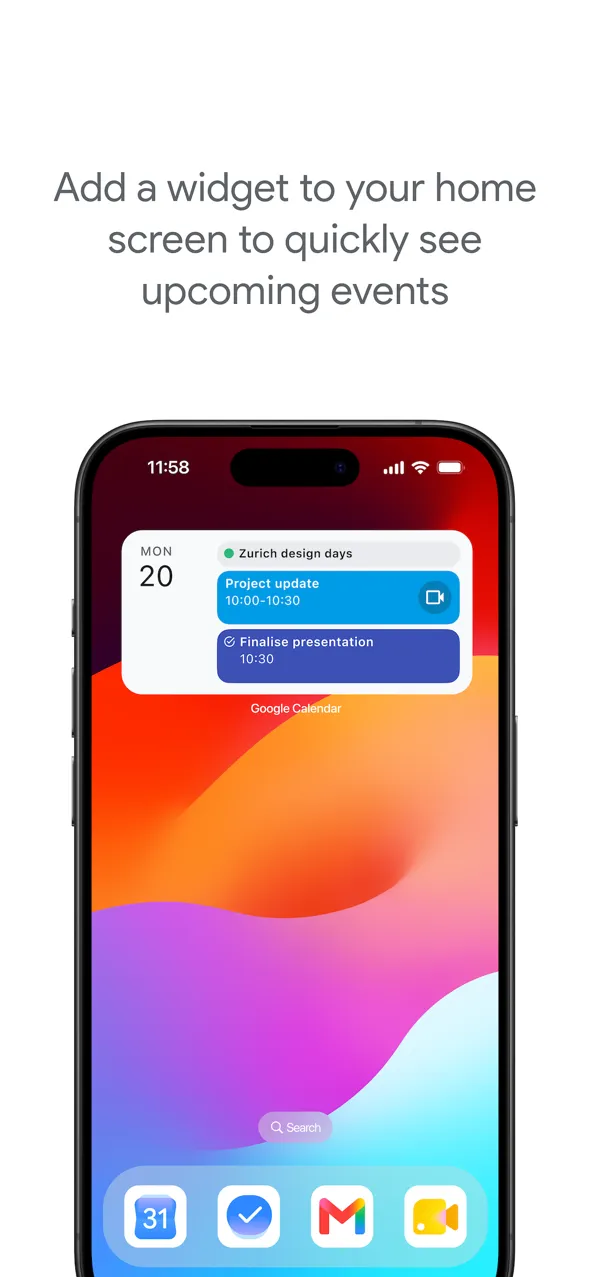 Block study sessions and deadlines, then get a reminder before each one.
“I will study later” is how a lot of focus is lost before a session even begins. Giving each session a fixed slot fixes that. In Google Calendar, create an event for every study block, colour-code them by subject and get a notification on your phone, in your browser or by email before each one starts. Month, week and day views show whether your week is realistic, and tasks sit next to your events for small jobs like “email the teacher”.
Our guide on how to plan your study week shows a simple way to do it in 15 minutes on a Sunday.
- Best for: students who mean to study but never pick a time
- Platforms: iPhone, iPad, Apple Watch, Android and the web
- Price: free
- Ratings: 4.5 on the US App Store (about 132K ratings) and 4.6 on Google Play
- Not for you if: you already have a fixed study routine that works
5. Notion: best for keeping notes and tasks in one place
 Notion keeps notes, tasks and course pages in one workspace.
Hunting for notes is a quiet focus killer. Every time you open another app to find last week’s slides, you risk ending up somewhere else. Notion puts notes, to-do lists, reading lists and course pages in one workspace. A simple setup is one page per course with notes and assignments together, plus a home page that shows what is due this week. When everything for a session is on one page, there is less reason to wander.
The Free plan gives one person unlimited pages and blocks, with uploads up to 5MB each and a 7-day page history. College and university students at accredited schools can get Notion’s Education Plan for free, as long as their school email is their account’s main email. You upgrade on desktop or web and re-verify once a year. K-12 students are not eligible and use the Free plan.
- Best for: students whose notes and tasks are spread across too many places
- Platforms: web, Mac, Windows, iPhone, iPad and Android
- Price: free, with the Education Plan free for eligible college and university students
- Ratings: 4.8 on the US App Store (about 90K ratings) and 4.6 on Google Play
- Not for you if: you would spend the whole evening designing pages instead of studying. Keep the setup simple.
6. Goodnotes: best for active study from PDFs, by hand
Reading slides or a textbook PDF on a screen is easy to do on autopilot. Working through them with a pen is harder to drift through. In Goodnotes you write and sketch by hand, mark up PDFs like lecture slides and past papers, and record audio that stays linked to your notes. Handwriting search, on every plan including the free one, means you can find that one formula again later without scrolling through everything.
- Best for: tablet users who focus better with a pen in hand
- Platforms: iPad, iPhone, Mac, Windows, Android tablets and Chromebooks, and the web
- Price: free with 3 notebooks, 100MB of storage and 20 minutes of audio recording. Essential ($11.99 a year) unlocks unlimited notebooks, and Pro ($35.99 a year) adds sync across devices and real-time collaboration. Both have a 7-day free trial.
- Ratings: 4.7 on the US App Store (about 463K ratings)
- Not for you if: you type your notes, or you do not have a tablet and stylus
7. Khan Academy: best for getting unstuck on a topic
A lot of “losing focus” is really being stuck. When a topic makes no sense, your brain looks for something easier, and your phone is right there. Khan Academy, a nonprofit, has 840+ free courses for K-12 and early college in math, science, English language arts, social studies, economics, computing, life skills and test prep. A short video and a few practice questions with instant feedback and hints are often enough to get you moving again, and then you can go back to your own work.
- Best for: math and science topics that did not click in class
- Platforms: web, iPhone, iPad and Android
- Price: free (its AI tutor, Khanmigo, costs $4 a month or $44 a year for learners and families)
- Ratings: 4.6 on the US App Store (about 112K ratings)
- Not for you if: you need advanced university-level material
At a glance: what each tool actually does
Blocks or pauses apps
- Yes: Android Focus mode (pauses the apps you choose) and app timers, iPhone Screen Time (Time Allowances and a Screen Time Schedule)
- Silences notifications only: iPhone Focus
- No: Lilo, Google Calendar, Notion, Goodnotes, Khan Academy
Lets you focus with other people
- Lilo: live 3D study rooms, private rooms with chat, challenges with friends
Works on a laptop
- Yes: Notion and Goodnotes (Mac and Windows apps), Google Calendar and Khan Academy (in the browser), Focus and Screen Time (built into Mac)
- No: Lilo has no web or PC version
Free to use
- Free: iPhone Focus and Screen Time, Android Digital Wellbeing, Google Calendar, Khan Academy’s lessons
- Free version with paid upgrades: Lilo, Notion, Goodnotes
Which focus tool should you choose?
Go back to your last bad study session. If you lost it to your phone, set up a Study Focus and Screen Time limits on iPhone, or Focus mode on Android, tonight. If you never really started, put the session in Google Calendar and take a desk in a Lilo study room when the reminder goes off. If you drifted after 15 minutes, you need a rhythm: the Pomodoro technique works with any countdown, including Lilo’s free Focus timer set to 25 minutes. If your notes are everywhere, give each course one Notion page. If you were stuck, spend ten minutes on Khan Academy before you give up on the topic.
Many students end up with two tools: one that removes distractions (their phone’s built-in settings) and one that makes them want to study (Lilo, or a friend). That pair covers both halves of the problem, and they do not get in each other’s way.
How to get more out of any focus tool
- Decide the task before you start the timer. “Read pages 40 to 55” beats “study biology”.
- Start smaller than you think. A 20-minute session you finish is worth more than a 90-minute plan you abandon.
- Put your phone out of reach, even with Focus mode on. Distance is the cheapest focus tool there is. Our guide on how to stay focused while studying has more tricks like this.
- Study at the same time each day. A daily slot turns focus into a habit, and a study streak makes it visible.
- Bring someone in. A friend in the same room, a study challenge or a shared goal keeps you going on the days your motivation does not show up. More ideas in how to study with friends.
If studying alone is the real problem, download Lilo free and sit in a room for one session tonight.
Frequently asked questions
What is the best focus app for students?
It depends on why you lose focus. If studying alone feels impossible, Lilo's live study rooms and challenges with friends. If your phone keeps pulling you away, start with the tools already on it: Focus and Screen Time on iPhone, or Focus mode in Digital Wellbeing on Android. If you never get round to starting, block study time in Google Calendar. If you drift because a topic makes no sense, Khan Academy.
What is the best free focus app?
Your phone's built-in focus tools cost nothing and need no extra app. Google Calendar and Khan Academy's lessons are free, and Lilo's countdown timer, live study rooms and challenges with friends are free too. Notion and Goodnotes have free versions with optional paid upgrades.
Can I block distracting apps without downloading anything?
Yes. On Android, Focus mode in Digital Wellbeing pauses the apps you choose, so you cannot open them and they send no notifications. On iPhone, Screen Time lets you set Time Allowances and a Screen Time Schedule for apps, and a Focus silences notifications you do not want. Lilo does not block apps.
Is there a focus app where you can study with other people?
Yes. Lilo has live 3D study rooms where you sit at a desk next to other students, with no camera or microphone, plus private rooms for friends with a 6-character code and study challenges (time goal, speed race, ranking battle and streak).
Do focus apps actually work?
They work when they match the reason you lose focus. Pausing apps helps if your phone keeps pulling you away, but it will not make you start. A study room or a friend helps you start, but it will not lock your phone. Many students use one of each.
Which focus tools work on a laptop?
Notion and Goodnotes have Mac and Windows apps, and Google Calendar and Khan Academy run in your browser. Macs also have Focus and Screen Time built in. Lilo is a mobile app for iPhone, iPad and Android, with no web or PC version.
Keep reading
 8 Best Back to School Apps for Students in 2026 The 8 best back to school apps for students in 2026: apps to focus, organise your semester, learn a language, meet deadlines and get homework help.
 10 Best Study Apps for Students in 2026 (Mostly Free) 10 study apps compared by job: focus, notes, planning, languages and homework help. What each does for free, what costs money and who should skip it.
 How to Study With Friends (Online or in Person) Study with friends without it turning into a chat: session rules that work, camera-free study rooms online, and challenges that keep a group going.